
Tag: photoshop

  • Speed Sketches In Photoshop

    Speed Sketches In Photoshop

    Speed sketching with your tools is a great way to get your pen moving, and your drawing mind working. You can speed sketch in traditional media or digital, both are�a great way to warm up, or to shake things out in between projects. Speed sketches�force you to make decisions quickly and with less deliberation than a full-blown piece.

    Three Versions of Ambush In Orbit
    Three Versions of Ambush In Orbit

    For those of you following my recent posts on Instagram, Twitter, and Facebook, you’ve noticed that I’ve been adding more of these speed sketches recently using Photoshop and my Wacom Intuos Pro tablet. I’ve learned some new brushes that I don’t normally use, like some of the built-in paint brush emulators in Photoshop. Some are okay for my needs, while others better than I’d anticipated. Their angle and flat brushes are great for laying in quick areas of color as I draw these scenes.

    While some speed sketches have turned out better than I’d anticipated, and are themselves almost complete pieces, others haven’t turned out as well as I’d hoped. In this case, I started with the phrase “Ambush In Orbit” and began thinking of some John Berkey-like scenes in my mind.

    The planet and background were drawn first, and I spent almost an entire 45 minute session on these alone. I don’t always render the background first, but it helps set the tone of the main subjects. When it came time for the spacecraft, none of them matched what I originally had in my mind so I ended up with three different styles of spacecraft. I stopped near my standard 45 minutes on each of these, and while they are each a bit off from my planned vision,�I’m somewhat happy with them.

    Ambush In Orbit 1
    Ambush In Orbit 1

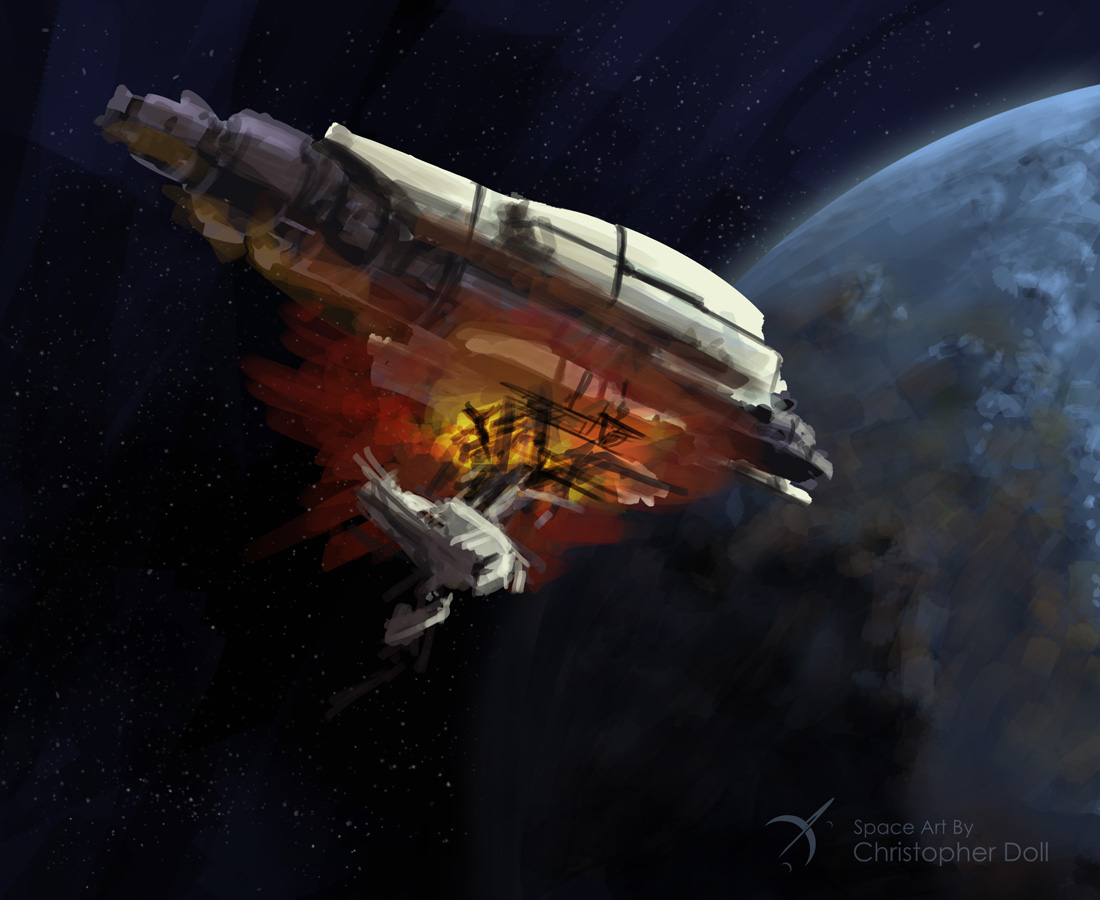
    This first version fell away from�the colors I wanted, with the ship being warmer than I’d intended. If I were to take this on to a finished piece I’d adjust the hue across the layers of the ship.

    Ambush In Orbit 2
    Ambush In Orbit 2

    The second spacecraft here just gave up on the whole notion of an orbital ambush, but those engines were just too fun to draw. And the Monty Python style helmet was cracking me up. I am still digging the indication of lit rooms, although it looks like a raging forest fire in there.

    Ambush In Orbit 3
    Ambush In Orbit 3

    None of the shapes in my third attenpt were working out so I started blocking out detail cuts from the form and throwing in the energetic engine colors. The engine flame layers were set to Color Dodge and duplicated to enhance the effect. Now it looks like a piece of wreckage, in my eyes, and a more fun direction than where I started. Again this would be taken a lot further as far as detailing is concerned.

    That’s a bit of a view on the process, and while sometimes they don’t come out the way you’d like, they’re still fun and good practice.

    About Christopher DolL

    CDoll_Sept2014Christopher Doll is an artist and designer from the greater Seattle area.� He specializes in astronomy, space travel, and science fiction themes. His work has been featured in a number of books, articles, and on the cover of several novels.

    Recently Christopher Doll published Coloring Space 1, the first in a new line of adult coloring books featuring spaceships. Check out the Space Art By Christopher Doll Store for this and other space-related artwork and gifts.

    Space Art By Christopher Doll Store
    Space Art By Christopher Doll Store
  • Book Cover Art Exercises

    Book Cover Art Exercises

    Winding into Fall of 2015, I have been taking my design sketches into more finished pieces. As fun as it’s been creating my #spaceshipaday entries, it’s clear that I also need to demonstrate more finished work like the ones I’m showing here. I set out with several goals for these drawings:

    • Draw something that would make me want to read this book (clearly from a science fiction aspect)
    • Tighten up details from my original sketches, while embracing my somewhat chaotic style
    • Practice more subtle use of color tones (often my color work stays a bit too saturated).
    • Most important – keep sharing work with the world and show people what I can do even though I already have several book covers out in print already.

    The first two pieces started out as #spaceshipaday line and marker drawings that garnered a lot of compliments and attention through Twitter, Instagram, and on Facebook. My thanks to you all who’ve been following along. I appreciate the comments and compliments I’ve received so far.

    Original Sketch for the John Berkey styled ship
    Original Sketch for the John Berkey styled ship
    Color pass and extra detail using Photoshop and a Wacom Intuos Stylus
    Color pass and extra detail using Photoshop and a Wacom Intuos Stylus

    Clearly influenced by my love of John Berkey’s artwork, I wanted to draw something that had the same amount of crazy and wonderful details as his work. Since I’ve time-boxed my initial sketches (45 minutes or less), it’s actually tricky to get in a lot of detail especially if you’re trying to make it fit in some fashion with the rest of the ship. Overall I was happy with the concept, although some pointed out that it’s starting to look like the spaceship from the Coneheads movie, or maybe even Colonial One from Battlestar Galactica (the new show). Influences aside, my focus was more on the process.

    The sketch was photographed and taken into Photoshop where I gave it a quick color pass (above). As of this writing, it is still unfinished, I’ll post the final in my Gallery.

    Heavy Transport in a deep atmosphere. Rendered with Procreate on an iPad
    Heavy Transport in a deep atmosphere. Rendered with Procreate on an iPad

    This next image was also quite popular as a sketch, this time I stepped more into Chris Foss territory. I tried to leave the atmosphere fairly bland compared to the ship itself, although looking at it now I think it could be even more diffused. I realize I’ve left in many of the lines from my original sketch. To me this is still one stage away from being a final cover art piece and my focus has been on trying to achieve an emotional impact with the design and rendering.

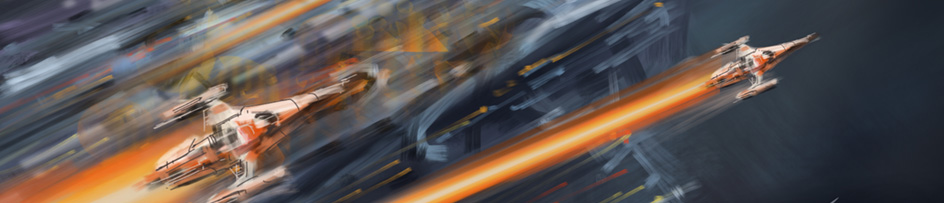
    Speed Chase - no sketch, entirely drawn with Procreate on an iPad
    Speed Chase – no sketch, entirely drawn with Procreate on an iPad

    Finally there’s this fun piece that was created entirely in Procreate on my iPad. There was no sketch. Sometimes everything comes together all at once and it all becomes a joy to witness. This is one of those moments where I just let my hand run free with only my artistic lizard brain at the controls. I don’t know of any other way to describe it but everything from the color, composition, and the frenzied style seemed to fit together nicely without a lot of effort. I would be inclined to read this book if I saw it in the store.